YouTrack alternative
Takahe vs YouTrack: both track time, Takahe adds the money.
YouTrack is JetBrains’ project management tool for all kinds of teams, with agile boards, a knowledge base and a helpdesk, and it tracks time too. Takahe stays smaller: tasks, time and project profit in one app, with AI agents that work under their own name.
Already have an account? Log in
Which one fits you?
Choose Takahe if
- You bill your time and want cost, revenue and profit per project.
- You want budgets that warn you at 80% and 100%.
- You want a tool your team learns in an afternoon, without workflows to script.
- You want AI agents with their own name, comments and time on a project.
Choose YouTrack if
- You run agile boards with sprints and plan with Gantt charts.
- You want a knowledge base and a helpdesk in the same tool.
- You want to host it yourself, or start free with every feature for up to 10 users.
- You need custom fields and workflows you can script.
Feature by feature
Takahe vs YouTrack, side by side
What each tool offers on its own, without add-ons from a marketplace. Checked on November 22, 2026 on JetBrains’s own pages, listed below.
| Feature | Takahe | YouTrack |
|---|---|---|
| Views | Takahe Yes. Board, list and calendar of the same tasks. | YouTrack Yes. Agile boards, issue lists, Gantt charts and more. |
| Time tracking | Takahe Yes. A timer on every task and manual entries, with notes, tags and a billable flag. | YouTrack Yes. Built in on every plan: spent time and estimates, with timer workflows you switch on. |
| Timesheets and time reports | Takahe Yes. A Time page per project and reports by project, list, person or task, with CSV export. | YouTrack Yes. Timesheets and ready-made time reports. |
| Rates, cost and profit | Takahe Yes. A cost rate and a bill rate per person and project. Reports show cost, revenue and profit. | YouTrack No. Time can be marked billable, but there are no cost or bill rates. |
| Project budgets | Takahe Yes. A budget in hours, in euros or both, with alerts at 80% and 100%. | YouTrack No. No project budgets. |
| AI agents over MCP | Takahe Yes. A built-in MCP server. An agent works on a project under its own name and tracks its own time. | YouTrack Yes. A built-in MCP server, which can also log work, and an AI assistant. The agent acts as the person whose token it uses. |
| Clients and guests | Takahe Yes. Invite clients to a team or to one project. As members, they never see rates or profit. | YouTrack Partly. A helpdesk for customer tickets. Clients who work in your projects count as users. |
| Sprints and roadmaps | Takahe No. No sprints, story points, roadmaps or Gantt charts. | YouTrack Yes. Agile boards with sprints, and Gantt charts. |
| Custom fields and automations | Takahe Partly. Lists as stages, tags, priorities and estimates. No custom fields or automation rules. | YouTrack Yes. Custom fields and workflows written in JavaScript. |
| Integrations | Takahe Partly. Webhooks, an MCP server and a Chrome extension. No integrations marketplace. | YouTrack Yes. JetBrains IDEs, version control systems and more. |
| Mobile | Takahe Partly. Made for the phone’s browser and installs to the home screen. No app in the app stores. | YouTrack Yes. Apps for iOS and Android. |
| Self-hosting | Takahe No. Cloud only. | YouTrack Yes. YouTrack Server, free for up to 10 users. |
| Sign-in and SSO | Takahe Partly. Passkeys and two-factor authentication. No SAML single sign-on. | YouTrack Yes. SAML 2.0 single sign-on. |
See whether a project pays
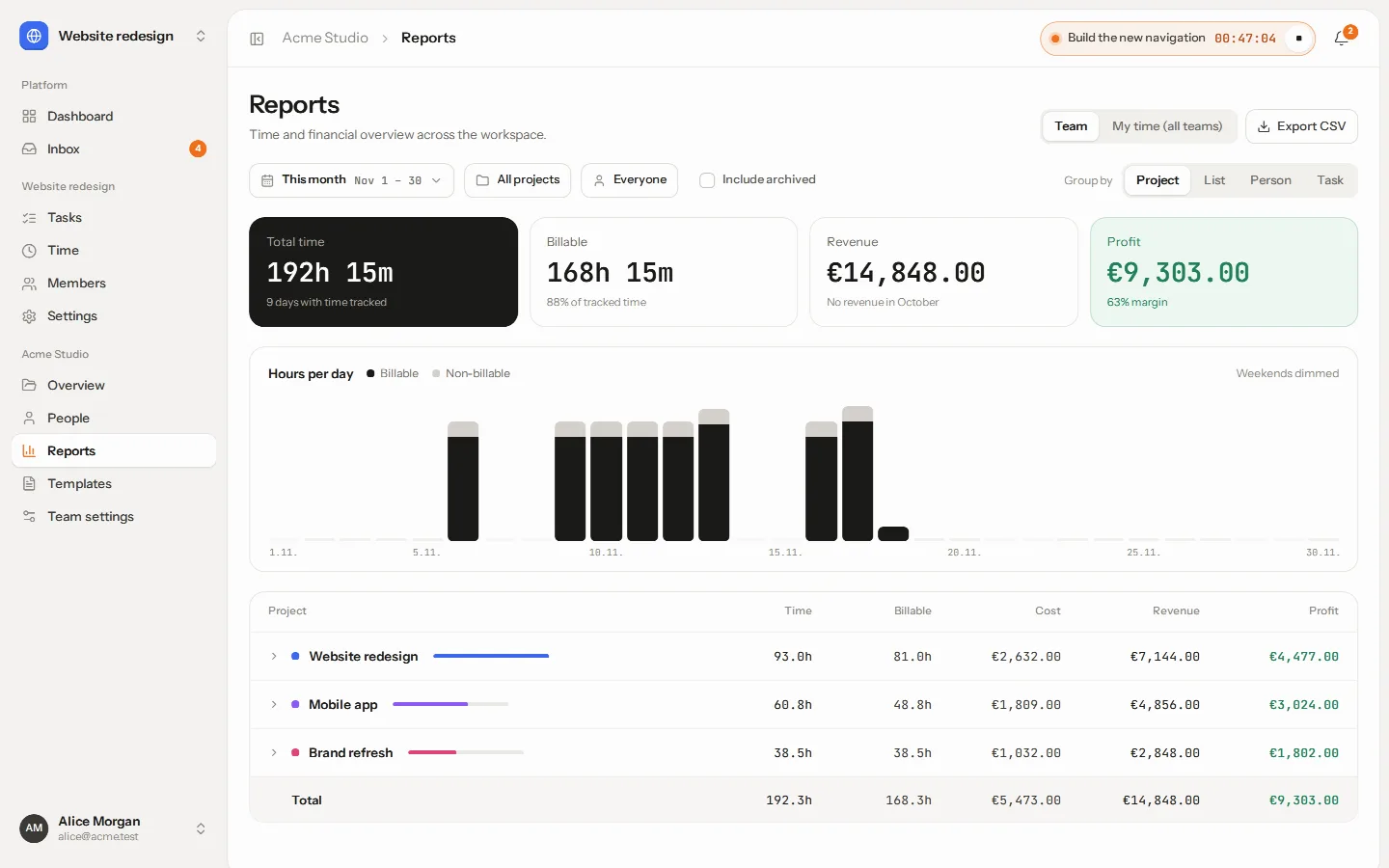
YouTrack tells you how many hours went into an issue. Takahe also tells you what they cost and earned: each entry keeps the rates it was tracked with, and reports show profit by project, person and task.
- A cost rate and a bill rate per person, set for the team and adjusted per project
- Budgets in hours or euros, with alerts at 80% and 100%
- Only the people who manage a project see the money
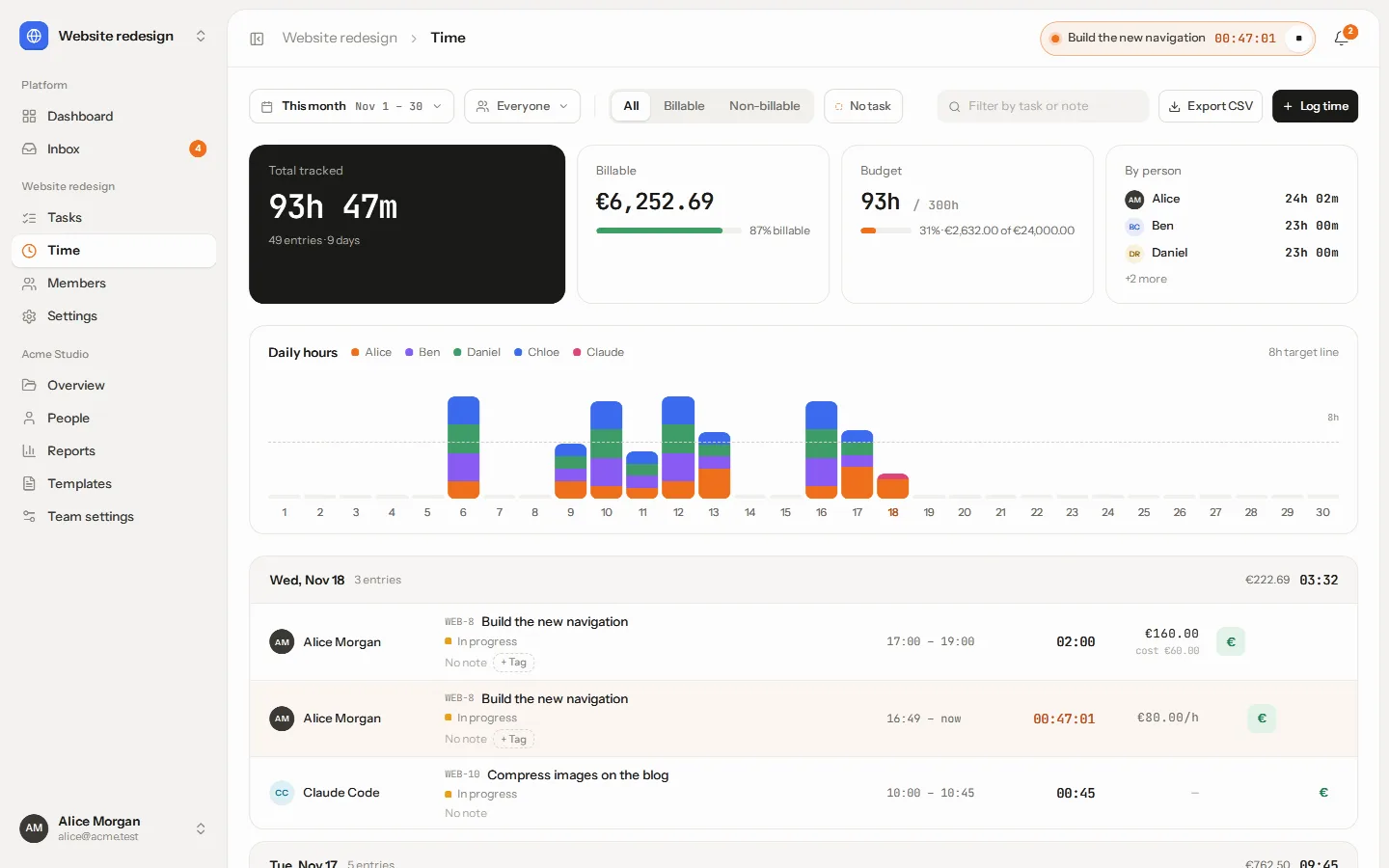
A timer on every task
Start the timer from a card, the top bar or the dashboard, with nothing to switch on first. The running timer follows you on every page, and an e-mail reminds you when it has been running for 8 hours.
- One click on a card starts the timer, which stays in the top bar on every page
- Log forgotten time afterwards with a start and an end, or a duration such as 1:30
- Each project’s Time page sums up its hours, people and days, with CSV export
Up and running in minutes
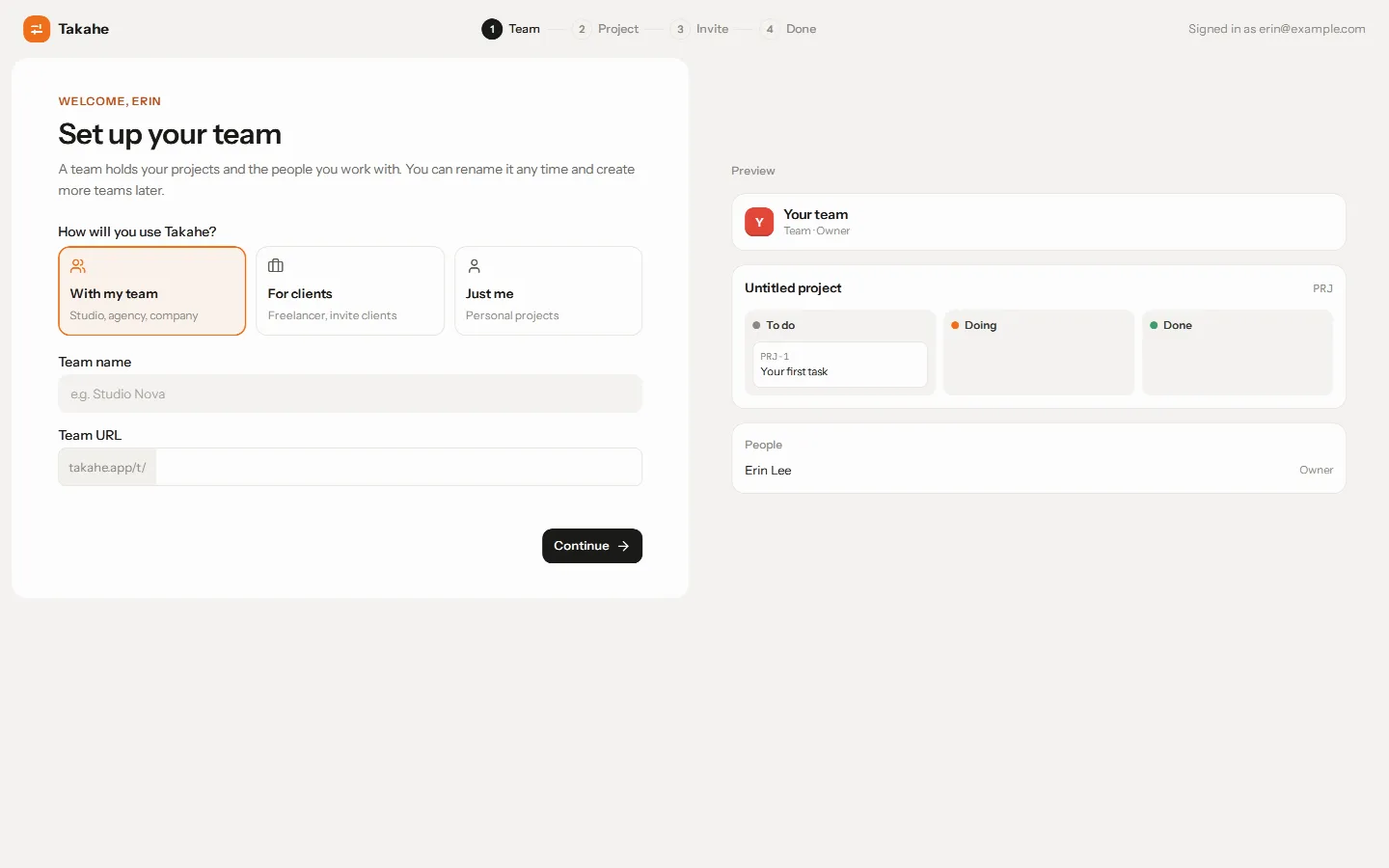
Takahe has no workflows to script or fields to configure. Lists are the stages of your board, and a short wizard sets up your team and first project.
- Start from a blank board or a template with lists and starter tasks
- Invite your teammates by e-mail with a role
- Board, list and calendar views work from the first task
AI agents that track their own time
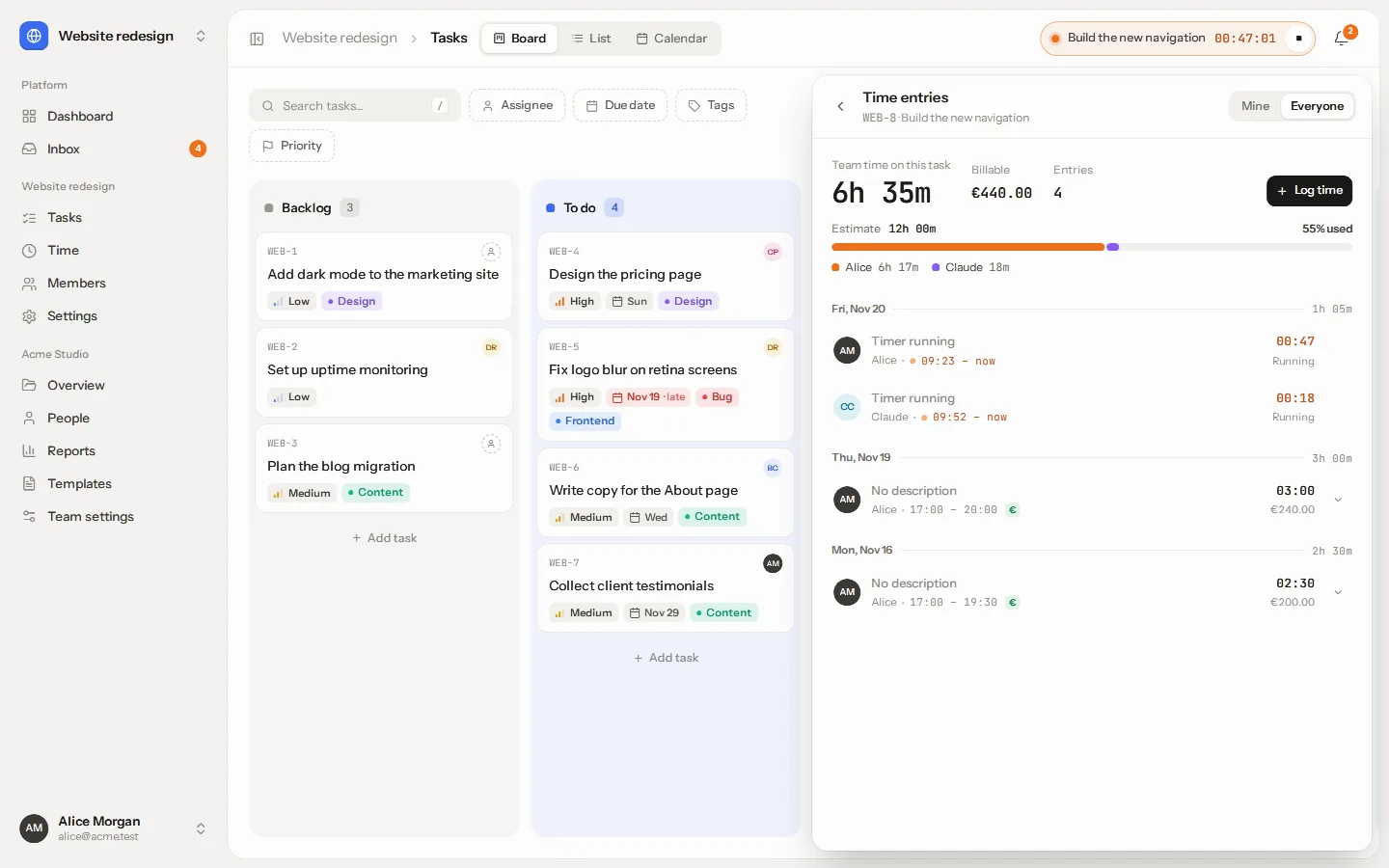
YouTrack’s MCP server acts as the person whose token it uses. In Takahe, a project token gives the agent its own name, so its comments, changes and time are its own.
- A project token gives the agent its own name, marked “mcp”, on one project
- It reads tasks and files, comments, creates subtasks and moves cards
- It never sees rates or profit and can’t sign in to the web app
FAQ
Questions, answered
Is Takahe a good YouTrack alternative?
For agencies and small teams that bill their time, yes: Takahe adds rates, budgets and profit to time tracking, with less to set up. If you need sprints, Gantt charts, a helpdesk or self-hosting, YouTrack fits better.
Do both tools track time?
Yes. YouTrack has built-in time tracking with timesheets, time reports and timer workflows. Takahe adds a cost rate and a bill rate to every hour, so its reports also show cost, revenue and profit.
Can I host Takahe myself?
No. Takahe runs in the cloud only. If you need to host your tracker yourself, YouTrack Server is an option.
Can I move my work from YouTrack to Takahe?
There is no YouTrack import. Paste a list of task titles into a Takahe list and each line becomes a task, or start from a project template. An AI agent connected to both tools over MCP can also copy your open work for you.
How we compared
We checked what this page says about YouTrack on November 22, 2026, on these pages from JetBrains. Plans and features change, so look there for the latest.
- YouTrack pricing
- Time tracking in YouTrack
- Timer workflows
- Work item attributes
- YouTrack MCP server
- What’s new in YouTrack
- SAML authentication
YouTrack and JetBrains are trademarks of JetBrains s.r.o. Takahe isn’t affiliated with or endorsed by JetBrains.
Try Takahe on a real project.
Create your account, set up a project and track your first hour in a few minutes. Keep YouTrack open next to it and compare for yourself.
Already have an account? Log in