Know what’s being worked on, how long it takes and whether it pays.
Takahe brings a kanban board, time tracking and project profitability together for freelancers, agencies and small teams. Your AI agents work in it as teammates, too.
Already have an account? Log in
Features
Everything your team needs every day. Nothing it doesn’t.
Takahe is fast, clear and does three things properly: tasks, time and money.
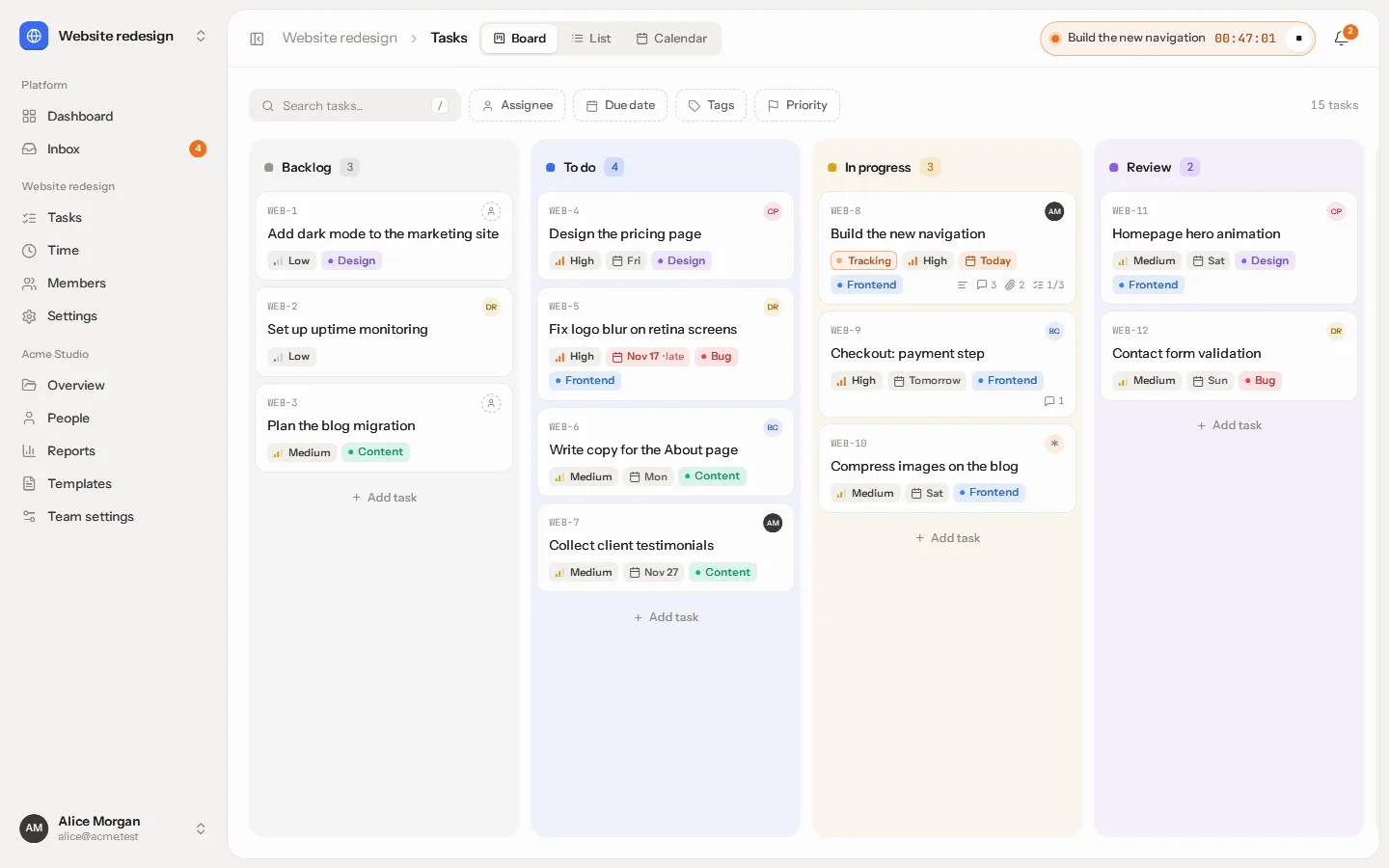
Three views of the same tasks
A board to talk with the team, a list to sort and filter, a calendar for deadlines. Switch with one click, nothing is copied.
A timer that follows you
Start it on a task and it runs in the top bar on every page.
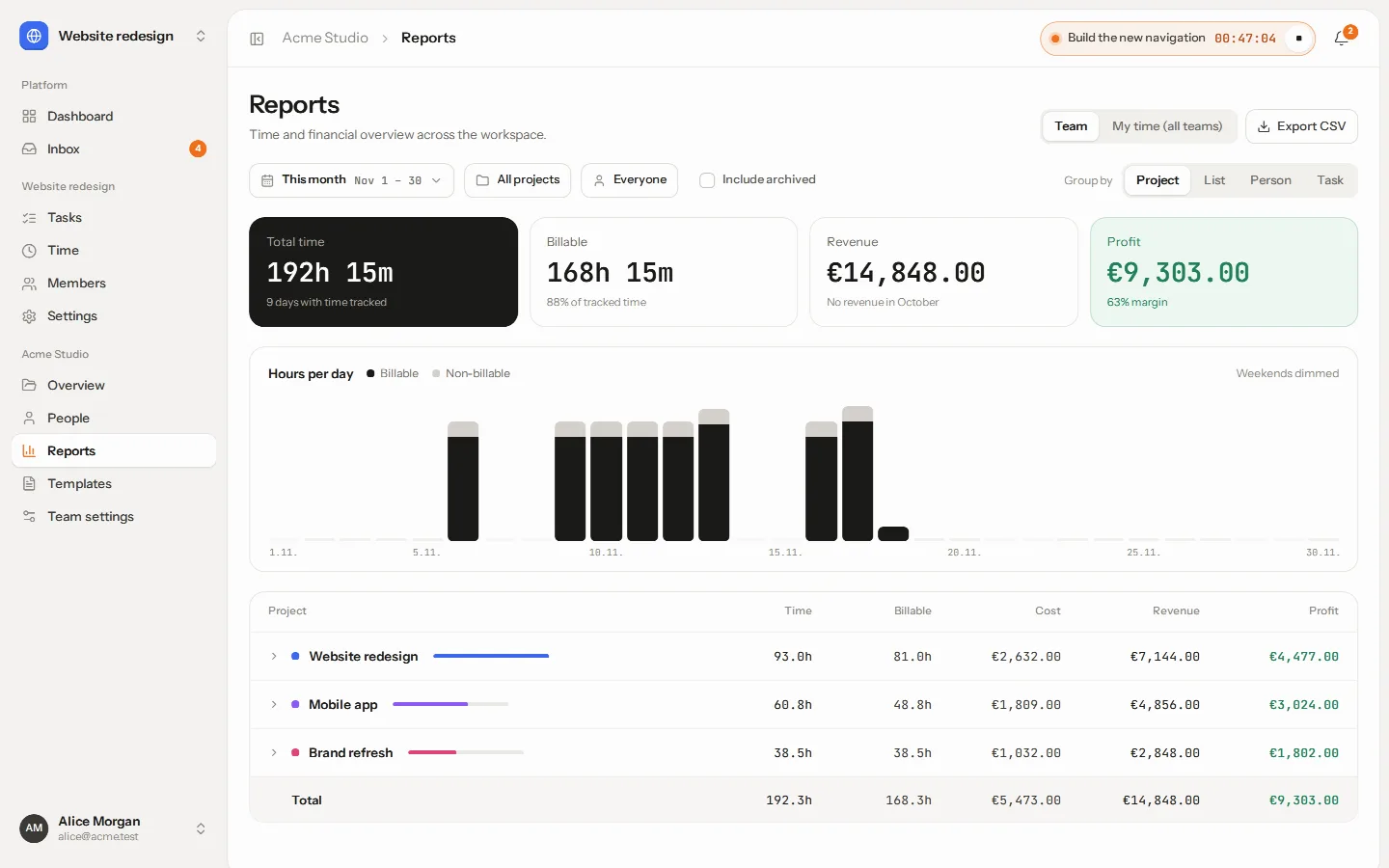
See whether a project pays
Set what an hour of each person costs and what you bill for it. Takahe works out the rest.
Inbox: what’s due today
The tasks assigned to you, sorted by due date. Open it in the morning and you know what to do.
⌘K and everything is at hand
Jump to any task, project or action without digging through menus.
Teams and roles per project
Invite people by e-mail and give each a role on the projects they work on. They see only what they should.
AI agents
Your AI agent gets its own seat in Takahe.
Through the MCP server it works with tasks like a person does, but under its own name. You always see what the agent did and what you did.
- A token per project. In the team, the agent is marked “mcp”, not as you.
- Reads tasks and comments, creates subtasks, moves cards and writes updates.
- Starts and stops its own timer, so its time is never missing.
› Pick up WEB-9 and get going.

get-task-tool       WEB-9           ✓
start-timer-tool    WEB-9           ● running
  … code, tests, commit …
add-comment-tool    WEB-9           ✓
  “Done, the PR is waiting for review.”
update-task-tool    WEB-9 → Review  ✓
stop-timer-tool     1h 24m          ✓
Reports
Invoice-ready numbers without a spreadsheet.
Hours by project, person, list or task. You see the gap between what you bill and what you pay right away, not at the end of the month.
- Group by project, list, person or task
- Budgets in euros and in hours, with alerts
- Rates and profit only for the people who manage
Get started
Your first project is up in ten minutes.
-
01
Create your account
Sign up with your name and e-mail and confirm the address. That’s all it takes.
-
02
Set up your team
Name your team, then start a project from a blank board or a template. Tasks get IDs such as WEB-12.
-
03
Invite people and track
Invite teammates by e-mail and agents by token, then start the timer on your first task.
Step by step in the Quick start guide.
The name
Why Takahe?
The takahē is a flightless bird from New Zealand. People thought it was extinct for about fifty years, until a search party found it alive in 1948. Careful breeding and predator trapping have since brought it back to about 500 birds.
We like that story for what we build. Work gets forgotten, hours go unbilled and money slips by. Takahe keeps count, so nothing is quietly lost.
- Everything counted. Every task, hour and euro is tracked, so nothing quietly disappears.
- Found again. Open tasks, running timers and budget alerts keep forgotten work in view.
- One step at a time. The takahē doesn’t fly. It walks, steadily. Good project work looks the same.
The name is usually traced to the Māori word takahi, “to tread”. A track is what you leave when you tread a path, and that is what this app records.
The takahē story
Found again
Thought extinct for about 50 years, takahē are found alive in the Murchison Mountains.
About 100 birds
Numbers fall again to roughly 90 to 100.
About 500 birds
Captive breeding and predator trapping bring the population back.
Takahē is a taonga, a treasured species, of Ngāi Tahu, who work with the New Zealand Department of Conservation to protect it. We borrowed the name with respect. Learn about the recovery.
FAQ
Questions, answered
What is Takahe?
Takahe is a project management and time tracking app for freelancers, agencies and small teams. You plan work as tasks on a board, a list or a calendar, track time on them with a timer, and see what that time costs and earns against each project’s budget.
Who is Takahe for?
Studios, agencies and small companies that bill their time, freelancers who work with clients, and anyone who wants tasks and time in one place. Each company or client gets its own team, so their projects and people stay apart.
Can AI agents work in Takahe?
Yes. Takahe has a built-in MCP server. Connect Claude Code, Codex, Cursor, Grok, Amp or another MCP client, and the agent can read tasks, comment, create subtasks, move cards and track its own time. A project token gives the agent its own name, so you always see what it did.
Who can see rates, cost and profit?
Only the people who manage a project: its owner and the owners and admins of its team. Members see their own time and their own earnings. AI agents never see money.
Does Takahe work on a phone?
Yes. Takahe runs in your phone’s browser, and you can add it to your home screen like an app. The board, task lists, pickers and filters are made for touch.
How do I get started?
Create an account with your name and e-mail, then confirm the address. A short wizard sets up your team and first project, from a blank board or a template, and lets you invite your teammates.
Stop guessing where the time went.
Create your account, set up your first project and track your first hour in a few minutes.
Already have an account? Log in